Content from S3
A SmartFolder rule copies files from an S3 bucket into a SmartPlayer content folder at a configured interval.
Preparation
You need the storage access key, secret key, region, bucket, host address and file path. Setup requires access to the storage service and permission to manage folder rules in SmartPlayer.
Create a rule
Create and select a folder
Go to Content → Create folder, enter a name and click Create. Select the folder with one click.
Add a rule
Open Rules in the right panel, click + and enter a Rule name first. A rule cannot be saved without a name.
Enable S3 storage
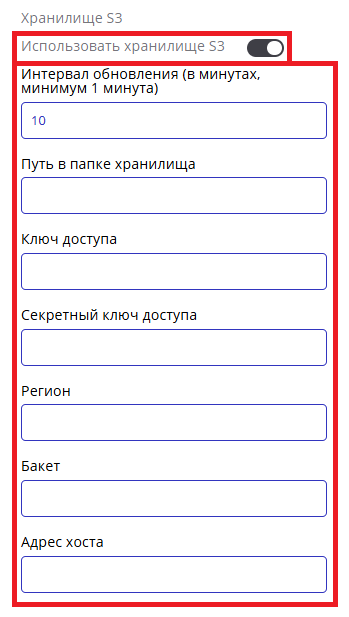
Scroll down to S3 storage and enable it. Enter the connection parameters and refresh interval in minutes (at least 1 minute). The path / searches all folders in the storage.
Save and verify the download
Click Save, then Close. The folder receives a Smart label. After the configured interval, the server starts copying available files from the bucket; check that they appear in the folder.
Synchronisation behaviour
- Available files are read from each folder; the original folder name is preserved when copied.
- JSON files do not become standalone playable content. Their contents appear in the folder description, accessible through Edit.
- Edit or delete the rule in the rules list. Deleting it disables synchronisation with the bucket.
S3 populates a folder on the SmartPlayer server. Use its content in broadcasts through a smart folder, as with other media library folders.
Sources
SmartPlayer Wiki — Интеграция с бакетом через S3 в рамках SmartPlayer/ru