Distribution management
Add client application packages to the personal account catalogue or the licensing account.
Upload a package to the account
This operation adds a distribution to the catalogue. To download an existing installer for a player, use Client distributions.
Open the upload form
Go to Distributions → Upload distribution in your account.
Enter the parameters
Enter the Version using dots as separators, Upload type (new distribution or update), Description and Platform. Attach the Distribution file.
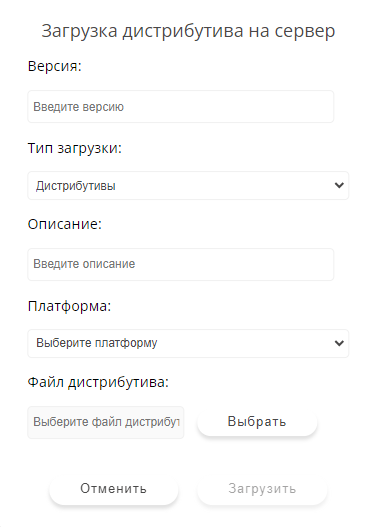
Check the package
Check that the version, platform and file match before uploading. For Windows updates, consider the distribution type and user permissions.
Licensing account
In the licensing account, select a company, click Details, then Upload distribution on the company page. The fields are the same: version, upload type, description, platform and file.
The administrative function depends on the account and permissions available to you. If the button is missing, contact your administrator or SmartPlayer support.
Sources
SmartPlayer Wiki — Загрузка клиентского приложения в личный кабинет пользователя/ru