Android P2P downloads
Set up a storage device so that Android devices in a group can receive files from it.
Setup
Open group settings
Select a group in Devices and choose Group settings in the right panel. Select Android OS, then expand P2P downloads.
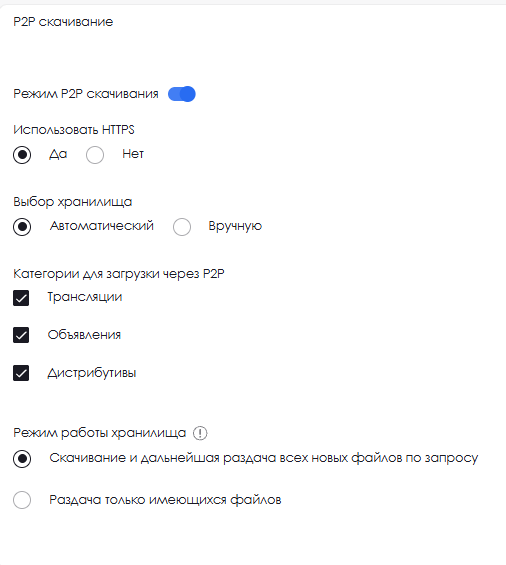
Enable P2P and choose storage
Enable P2P download mode. Storage can be selected automatically or manually from the group. For mixed hardware, choose a player with enough performance and available storage.
Select file categories
Enable the required categories: broadcasts, announcements and distributions. At least one category must remain enabled.
Set the storage mode
Choose a mode below and configure Use HTTPS to encrypt transfers. Save the group settings.
Storage modes
| Mode | Behaviour |
|---|---|
| Share existing files only | Shares files already on the device; does not download missing files for sharing |
| Download and share | Can download a missing file when requested and then share it with other devices |
If automatically selected storage goes offline, a replacement is not assigned automatically. Open the storage selection settings and reassign it. Manual mode offers selection from the device list and automatic reassignment.
Check before rollout
Use a test group to verify downloads for each selected category and storage availability. P2P delivers files; simultaneous page starts require separate playback synchronisation settings.
Sources
SmartPlayer Wiki — Работа peer-to-peer (P2P) на Android/ru